
Website for Ecommerce: 7 Best Platforms to Build Your Store
The best website for ecommerce is the one that matches what you sell and how your customers like to buy. A good pick is quick to set up, clear about fees, and able to grow without a rebuild. If you sell through WhatsApp and social media in Mauritius, Blue Growth's store is the closest fit. Shopify suits sellers of physical products who expect to scale. Wix and Squarespace suit design-led brands. WooCommerce suits anyone already on WordPress, and Square Online suits shops with a counter or a market stall.
Every builder promises a store in an afternoon. The pricing page rarely shows what you will really pay once themes, apps and card fees are added. Feature lists also blur together until every platform sounds the same, and a wrong choice means rebuilding your catalog later.
This article covers seven platforms, each judged on how it works, who it suits, and what it costs. After the list you get a side-by-side cost example, and then design lessons from well-built stores. We are Blue Growth, a Mauritius-based digital agency, so we list our own store first and say where it does not fit. Prices from other platforms are in US dollars, and ours are in Mauritian rupees.
1. Blue Growth E-Commerce Platform
Blue Growth's E-Commerce Platform is the pick for Mauritian sellers who close sales in chat. It is built for businesses that talk to customers on WhatsApp and social media more than they browse a catalog, and it is free to start.

How it works
Blue Growth's store is an online store that Blue Growth sets up, brands and supports for you. Customers shop in your storefront, and the same store takes orders from your social media channels and WhatsApp. The storefront goes live in days, and the team can handle the whole launch, including products, branding and payments.
The feature that sets it apart is the WhatsApp AI Sales Agent. You connect your own WhatsApp number during setup. The agent then answers questions from your own products, builds the cart and takes the order in the customer's language. When a customer asks for a person, it hands the chat back to you.
Who it suits
This store suits small and growing businesses in Mauritius that already talk to customers on Facebook, Instagram and WhatsApp. Typical sellers are in food and specialty products, fashion and accessories, beauty and lifestyle, or general retail. You speak directly with the people doing the work, in English or French, and they reply within one business day.
It is a weaker fit if you need a very large app marketplace or code-level control. Shopify and WooCommerce below give you more room for that. Blue Growth also brings store, branding and marketing together, so you deal with one partner instead of three.
Pricing and limits
All prices are in Mauritian rupees, and every plan has 0% commission on sales.
- Free, Rs 0: up to 10 products, an online storefront and order management. No card is required.
- Core, Rs 2,500 per month: everything in Free, plus unlimited products and orders, your own domain, your own branding, and AI tools you can add anytime.
- Complete, Rs 5,000 per month: everything in Core, plus the WhatsApp AI Sales Agent with unlimited AI conversations, order tracking in chat and priority support.
There are no contracts, and you can cancel anytime. Payments run through Peach Payments or Stripe, subject to the provider's eligibility and approval. The provider bills its own processing charges, and domain registration is a separate cost confirmed before you start.
Start on the free plan, and upgrade only when ten products stop being enough.
2. Shopify
Shopify is the safest default for sellers of physical products who plan to grow. It is built only for selling, and it has the biggest ecosystem of themes, apps and freelancers of any hosted platform here.
How it works
Shopify is a hosted platform, so you never touch servers or updates. Its AI setup assistant asks about your products and produces a working starter storefront within minutes. You then adjust it with free or paid themes. You can sell unlimited physical and digital products, and the platform connects to Amazon and Instagram.
Anything missing from the core product usually exists as an app in the Shopify app store. Shopify also ships AI features, including an assistant called Sidekick that helps with onboarding and generates sales reports from your store data. These save time, but they do not change how the platform works.
Who it suits
Shopify fits sellers who expect to add products, channels and staff over time. Because it is so popular, help docs, tutorials and experienced designers are easy to find. If you outgrow your first setup, you rarely need to switch platforms.
Very small stores can find it more than they need at first. The editor also feels restrictive compared with Wix, and deep design changes often need code or a paid theme.
Pricing and limits
Competing reviews quote the Basic plan at roughly $29 to $39 per month, depending on billing term, so check the live pricing page. Beyond the plan, count these costs:
- Card fees of 2.9% + $0.30 per sale on Shopify's built-in gateway.
- An extra transaction fee if you use an outside gateway (2% on Basic).
- Most themes are paid, from about $100 to $140 and up.
- Paid apps, which can add up quickly.
Shopify is the safest default for physical products, provided you budget for themes and apps on top of the plan.
3. Wix
Wix is the pick when design freedom matters most and the store is one part of a bigger website. It gives you more control over layout than any other beginner-friendly builder on this list.
How it works
The drag-and-drop editor lets you place elements almost anywhere, and there are 800+ templates across industries. Wix's AI builder asks a short quiz and generates a ready-made site. Reviewers report it gets you most of the way there in minutes, and you refine the rest by hand.
Core store tools are included from the lowest ecommerce plans, including order tracking, automated sales tax and abandoned cart recovery. An app market adds connections to services such as QuickBooks and Shippo.
Who it suits
Wix suits businesses that want a branded site with about pages, a blog and a store under one roof. If you enjoy tweaking layouts, you will like it. If you want the fastest path to a first sale, you may find it fiddly.
Know the trade-offs before you commit. You cannot change your template after publishing. The editor has a learning curve, and reviewers measured slower load speeds than Shopify or Squarespace.
Pricing and limits
Ecommerce plans start at about $43 per month on the Business plan. Higher tiers add storage, customer support tools, extra marketing features and more bandwidth. Wix Payments charges 2.9% + $0.30 per transaction, and other gateways have their own rates.
Wix is a hosted builder, so your hosting is included. Themes are mostly free, which keeps extras lower than on Shopify, although paid apps still add to the bill.
Pick Wix for design freedom, and choose your template carefully because you cannot swap it later.
4. Squarespace
Squarespace is the pick for visual brands with a small catalog. If a few well-photographed products are your whole business, it gives them a polished home with very little effort.
How it works
Squarespace uses a clean grid system, which makes it hard to break a layout. You can change fonts, color palettes and animations without touching code. Templates are mobile-optimized from the start.
Built-in email marketing and analytics come with the platform. It also handles bookings and digital services well, which suits makers who sell both products and appointments.
Who it suits
Think photographers, ceramicists, boutique fashion labels and studios selling a handful of items. You want the site to look expensive without hiring a designer.
It is not built for high-volume stores. It is less flexible than Wix, third-party extensions are limited, and there is no free plan, so you pay from day one.
Pricing and limits
Squarespace sells through tiers that differ mainly in fees and features:
- Business: you can sell online, but with a 3% transaction fee, so it suits testing the waters.
- Basic Commerce: removes that fee and adds customer accounts, point of sale and inventory tracking.
- Advanced Commerce: adds abandoned cart recovery, subscriptions and real-time shipping rates.
Plan names and prices change, so confirm them on the live pricing page before you commit.
Squarespace gives a few great products a polished home, but it is not built for large catalogs.
5. WooCommerce
WooCommerce is the pick if you already run a WordPress site and want to add a store to it. It is a free plugin, which makes it the cheapest option on paper and the most hands-on in practice.
How it works
You install WooCommerce like any other WordPress plugin. Orders, coupons and sales reports then live in the same dashboard you already use. Adding a product feels like writing a post, with extra fields for price, images, categories and tags.
When you need more, a large extensions marketplace covers real-time shipping rates, payment gateways and subscriptions. Because it is self-hosted, you also take care of hosting, updates and security yourself.
Who it suits
WooCommerce suits people who are comfortable with WordPress or have a developer on call. It is also the natural route for anyone searching for how to put ecommerce on a website they already own.
If you do not know WordPress and do not want to learn it, the setup will cost you more time than a hosted builder. A theme that supports WooCommerce is also required.
Pricing and limits
The plugin is free for standard features on a self-hosted WordPress site. You still pay for hosting, a domain, any paid extensions and card fees from your gateway. A managed WooCommerce hosting option exists from WordPress.com, with one plan listed at around $40 per month.
Costs are therefore low and variable, rather than fixed and predictable. Run a quick estimate of hosting plus the extensions you really need before you call it free.
WooCommerce is cheapest on paper, but you pay for it in time and maintenance.
6. Square Online
Square Online is the pick when you also sell in person, at a shop counter, a farmers market or a craft fair. It is a store that treats your physical sales and your web sales as one business.
How it works
Square is known for point-of-sale terminals, and its online builder runs on Weebly technology. Online and offline orders sit in a single dashboard, and inventory syncs across both. If you sell your last item at a market stall, nobody can order it online later that day.
Setup starts with a detailed questionnaire about your business, then walks you through the configuration. Storefront customization is more limited than on Wix or Squarespace, with fewer themes.
Who it suits
It fits offline retailers moving online and makers who sell at events. It is less suited to internet-first brands that want a distinctive design.
Square's availability and supported payment methods depend on your country, so check them before you plan around it.
Pricing and limits
The free plan includes unlimited products and a Square-branded site. Paid plans remove the branding and unlock custom themes and your own domain.
| Plan | Monthly price | Online card fee |
|---|---|---|
| Free | $0 | 3.3% + $0.30 |
| Paid | From $49 (billed annually) | 2.9% + $0.30 |
In person, a Square reader charges 2.6% + $0.10 per swipe, and the card reader itself can be free.
Square Online makes sense when a counter or market stall is part of how you sell.
7. BigCommerce
BigCommerce is the pick for established, high-volume sellers that list on several marketplaces. It is the small-business version of an enterprise platform, and it expects you to already sell a lot.
How it works
Onboarding asks you to set up sales tax and automated shipping straight away, which smaller stores often improvise. Selling on eBay, Amazon, Walmart and Facebook is a matter of connecting a channel. BigCommerce imports your products and keeps changes in sync.
The drag-and-drop builder is powerful, and 12 free themes are included. Most themes in the marketplace cost between $100 and $420.
Who it suits
It suits businesses already past the testing phase, with real order volume and several sales channels. The fit is poor if you sell ten items a month, because you pay for tools you will not use yet.
Its plans are tied to yearly online sales, so your growth moves you up the price ladder.
Pricing and limits
Plan prices rise with the sales cap, and gateway fees depend on the provider you connect.
| Plan | Monthly price | Yearly online sales cap |
|---|---|---|
| Standard | $39 | $50,000 |
| Plus | $105 | $180,000 |
| Pro | $399 | $400,000 |
BigCommerce rewards stores that already sell a lot, so skip it for a first test.
How to choose a website builder for ecommerce
Choose by what you sell, where customers talk to you, and what you will really pay each month, in that order. Features come last, because every platform here covers the basics.
Match the platform to what you sell
Start with your situation and work down this table.
| If you... | Start with |
|---|---|
| Sell through WhatsApp, Facebook and Instagram in Mauritius | Blue Growth E-Commerce Platform |
| Sell physical products and expect to grow | Shopify |
| Want the store inside a fully custom-looking site | Wix |
| Sell a few visual products | Squarespace |
| Already run WordPress | WooCommerce |
| Also sell at a counter or market | Square Online |
| Sell high volume across marketplaces | BigCommerce |
Digital sellers have extra options. Payhip, Sellfy and Fourthwall are built around downloads, memberships and automatic file delivery. Big Cartel's free plan covers up to five products, which suits an artist testing an idea.
What a store costs each month
A store has three kinds of cost. The first is the monthly platform fee. The second is payment processing, which is typically around 2.9% + $0.30 per card sale. The third is an extra transaction fee that some platforms add when you use an outside gateway.
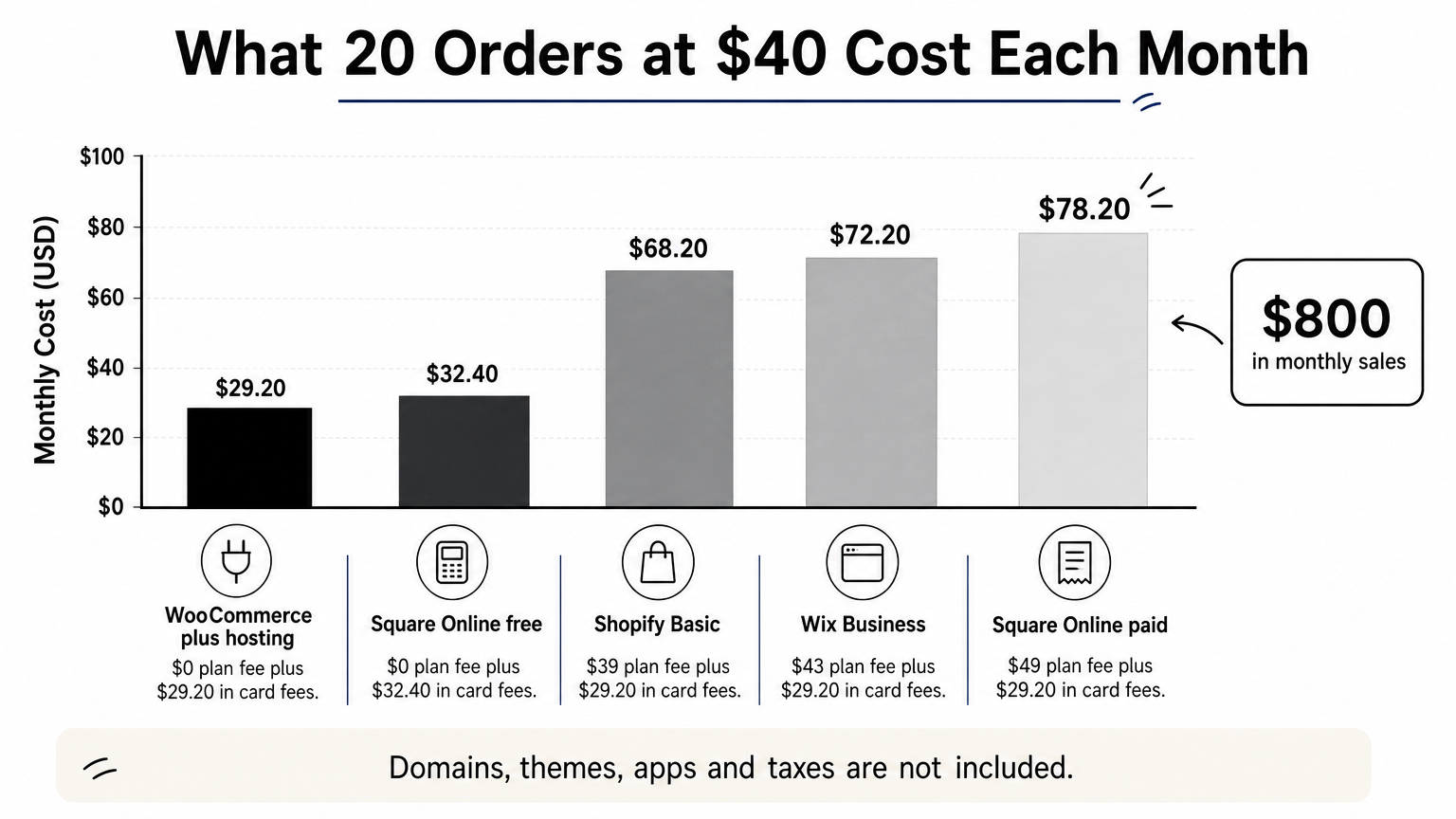
Here is a worked example. You sell 20 orders at $40, which is $800 in monthly sales.
| Platform | Plan fee | Card fees | Monthly total |
|---|---|---|---|
| WooCommerce | $0 (plus hosting) | $29.20 | $29.20 |
| Square Online (free) | $0 | $32.40 | $32.40 |
| Shopify Basic | $39 | $29.20 | $68.20 |
| Wix Business | $43 | $29.20 | $72.20 |
| Square Online (paid) | $49 | $29.20 | $78.20 |
The Shopify, Wix and WooCommerce rows assume a standard 2.9% + $0.30 card rate, and the Square free row uses its 3.3% + $0.30. The totals leave out domains, themes, apps and taxes. With Blue Growth you pay no commission, so the cost is the plan (Rs 2,500 per month on Core) plus your payment provider's own charges.
The plan price is only part of the bill, because card fees and add-ons decide what you really pay.
Add a store to an existing site or start fresh
If you already have a website, add the store to it instead of rebuilding. WooCommerce does this for WordPress. Wix and Squarespace include store tools in the site you already built. Ecwid is another route, since it plugs into an existing site, with a $5 monthly Starter plan for up to 10 products.
If you have no site yet, start with a hosted builder where site and store share one dashboard. Check one more thing before you commit: whether the payment provider supports your country and currency. This matters most for sellers in Mauritius, because a platform that is easy to set up is no use if you cannot take payments through it.
Well-designed ecommerce stores worth studying
The best stores win on clear photos, plain checkout and visible trust, not on clever effects. Studying a few of them shows what to ask your platform for before you design your own.
What good stores do well
The stores below are often cited for design. Stores redesign often, so open the live sites to see what they do today.

| Store | What to study |
|---|---|
| Glossier | Branding that carries from packaging into the shop, with heavy use of customer reviews and user-generated content |
| Nixon | Product listings with a swatch selector, rich product pages with the product's story, and a tool to customize your own watch |
| Size? | Fast guest checkout, a delivery countdown in the basket, and many payment methods including Apple Pay and Klarna |
| 24 Sèvres | Sleek product photography, a clean product page layout, and personal shopping through video chat |
| Clos19 | Minimalist design backed by a content-rich journal and an event planner |
How to apply the patterns to your store
When you design an ecommerce website, copy the habits, not the visuals:
- Shoot every product on a clean background, with at least one lifestyle image.
- Put price, delivery time and returns on the product page, above the fold.
- Offer guest checkout and the payment methods your customers already use.
- Show reviews and a visible contact option, such as WhatsApp, phone or email.
- Test every page on a phone first, since most shoppers browse on one.
Templates get you to a decent store quickly. If you want a custom design built around your brand colors, typography and imagery, Blue Growth's Website Development service quotes the work in writing after a free consultation.
Copy the habits of good stores, not their visuals: clear photos, plain checkout, visible trust.
Choose one and start selling
Pick the platform that fits what you sell and how your customers reach you, then launch small and improve from real orders. Shopify suits growing physical sellers. Wix and Squarespace suit design-led brands. WooCommerce suits WordPress owners, Square Online suits shops with a counter, and BigCommerce suits high-volume multichannel sellers. For Mauritian businesses that sell in chat, a store that turns WhatsApp conversations into orders removes the most manual work.
Run your own numbers before you decide, using the 20-order example above. Then check that your payment provider supports your country. A first test costs very little when a free plan exists.
If you want help choosing, talk to Blue Growth about a free-to-start online store. The first consultation is free, and scope and price are confirmed in writing before any work starts.